 在处理excel数据时我们经常会用到vlookup来做列匹配,以下面两个表为例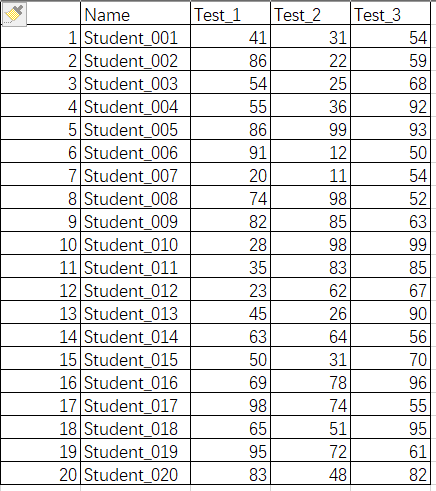
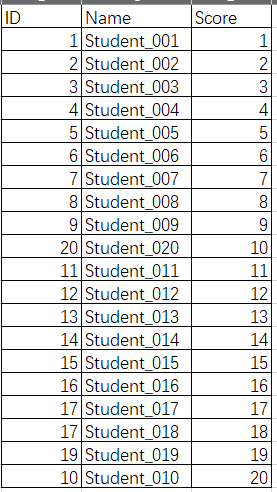 需要我们根据ID和Name两列的内容将两个表格合并。如果在excel中使用vlookup的话则应该为VLOOKUP(A2&B2,Sheet2!$A$2:$C$21,3)。此公式在使用起来会经常出现计算错误的情况,并且不简单。下面我们来介绍一种简单的方法。python的pandas库具备强大的excel数据处理能力,几条简单的指令即可轻松解决,准确又方便。1. 安装与导入库
pip install pandas # 安装import pandas as pd # 导入2. 读取数据
df1 = pd.read_excel('tabel_merge.xlsx', sheet_name='Sheet1') #读取表1df2 = pd.read_excel('tabel_merge.xlsx', sheet_name='Sheet2') #读取表23. 基于键值的合并(pd.merge)适用场景:共同列(如ID)关联数据
merged_df = pd.merge(df1, df2, on=['ID', 'Name'], how='outer')
只需要在on的参数中加入共同列的名字即可,无论多少个共同列轻松搞定。4. 保存结果
merged_df.to_excel('merged_data.xlsx', index=False) # 导出Excel
关于连接类型:| 接方式 | 参数 how=
|
说明 |
|---|---|---|
| 内连接 | 'inner'
|
仅保留两表共有的键 |
| 左连接 | 'left'
|
保留左表所有键 |
| 右连接 | 'right'
|
保留右表所有键 |
| 外连接 | 'outer'
|
保留两表所有键(补NaN) |
ID Name Test_1 Test_2 Test_3 Score0 1 Student_001 41.0 31.0 54.0 1.01 2 Student_002 86.0 22.0 59.0 2.02 3 Student_003 54.0 25.0 68.0 3.03 4 Student_004 55.0 36.0 92.0 4.04 5 Student_005 86.0 99.0 93.0 5.05 6 Student_006 91.0 12.0 50.0 6.06 7 Student_007 20.0 11.0 54.0 7.07 8 Student_008 74.0 98.0 52.0 8.08 9 Student_009 82.0 85.0 63.0 9.09 10 Student_010 28.0 98.0 99.0 20.010 11 Student_011 35.0 83.0 85.0 11.011 12 Student_012 23.0 62.0 67.0 12.012 13 Student_013 45.0 26.0 90.0 13.013 14 Student_014 63.0 64.0 56.0 14.014 15 Student_015 50.0 31.0 70.0 15.015 16 Student_016 69.0 78.0 96.0 16.016 17 Student_017 98.0 74.0 55.0 17.017 17 Student_018 NaN NaN NaN 18.018 18 Student_018 65.0 51.0 95.0 NaN19 19 Student_019 95.0 72.0 61.0 19.020 20 Student_020 83.0 48.0 82.0 10.0


 0
0